Legal Search from Lexis

LexisNexis has launched a beta version of its own Web search tool, called Lexis Web. Unlike general search sites such as Google, Lexis Web searches a more limited sphere of legal-oriented Web sites. The user guide says that the sites it searches have been selected and validated by the LexisNexis editorial staff, so that users "can trust that all content has met LexisNexis criteria for being authoritative and accurate."

This is similar in concept to the Law.com search tool, Quest, , which searches an editorially selected sphere of Web content in addition to Law.com's own content. The goal is to produce search results that are more relevant and targeted to legal users.

In addition to search results, Lexis Web displays a selection of "LexisNexis Recommended Sources." These are sources and libraries within the subscription version of Lexis.com. If you have a subscription, you can click on any of these recommended sources to run the same search there.

Another feature of Lexis Web is clustering to help you narrow your search results. Clusters are topical folders and subfolders shown in a pane to the left of the search results. A search for "Antonin Scalia" resulted in top-level folders for "Legal Topics," "People," and "Keywords," among others. You can also use this to narrow results by subject or geography.

In the search results, when you click on a link, it opens a nearly full-sized preview of the linked page. Click one icon in the preview to go to the actual page or another to close the preview.

Lexis Web is free, but the user guide includes this foreboding note: "During the beta offer, … all search activities will be available to you free of charge." Does this suggest Lexis plans to charge at some point? Charging for a Web search tool would make little sense, so let's hope not.

Labels:

posted by Robert Ambrogi @ 4:27 PM, , links to this post


'Stack' and Send Your Search Results

I wrote here in March about Searchme, a new search site, still in beta, that delivers results visually, showing pages rather than descriptions of pages. I learned today of two new features added to Searchme, one of which could be of particular use for research, presentations or any number of uses.

This new feature is called Stacks. It lets you collect groups of Web pages and then save them to a unique URL or share them via e-mail, blogs, Web pages or social-networking sites such as Facebook. Searchme has also added Media Search, which lets you search for images and videos from Flickr and YouTube. Images and videos can also be added to a stack, to create a collection of Web pages, images and videos around a particular subject.

All of this is easy to do. After you perform a search, you can click the "stack" button to create a new stack and give it a name. As you browse the Web pages shown in your search results, simply drag any you want to keep onto your stack. The same goes for images and videos -- drag them onto your stack and they are saved there. When you display your stack, it displays in the same flowing manner as the Searchme search results, which I compare to the way in which iTunes displays album covers. As you flow through videos in your stack, they begin to play automatically.

Here is a stack I created for the search "antonin scalia," including Web pages, images and videos:


SearchmeMaximize stack view
You can learn more about Stacks through this demo video or see an assortment of sample stacks at this page.

Labels:

posted by Robert Ambrogi @ 8:39 PM, , links to this post


Hillary Would be Happy With These Results

A new search engine, Picollator, purports to search for images on the Web that match images you upload. It uses pattern recognition to look for matching visual objects in other images. In this way, it claims, is helps "find photos of people more easily than any existing text-based search system. You can simply upload a photo with people to launch the search process." OK, I thought, let's try Hillary Clinton. See below for the results I obtained. Nice pics, but for precision, I'll take text-based search, thank you.

Labels:

posted by Robert Ambrogi @ 10:51 PM, , links to this post


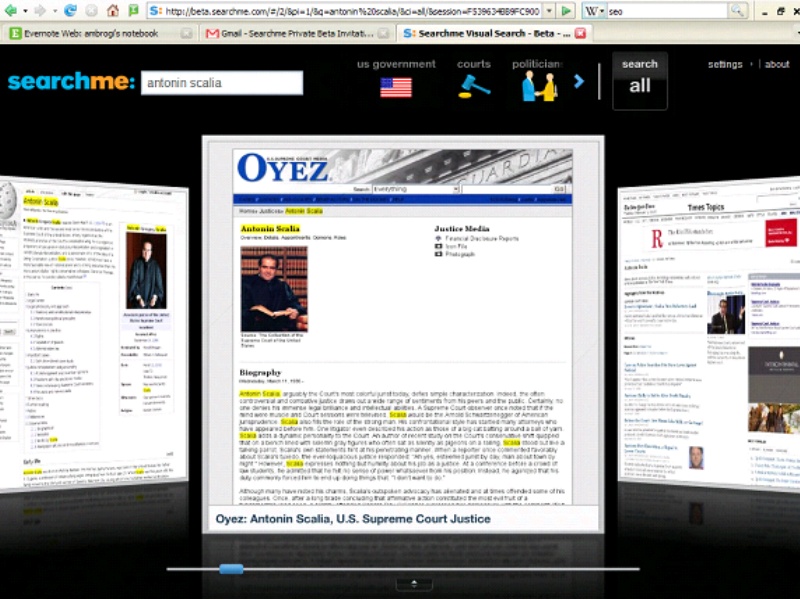
Searchme: Search Goes Visual


I have been testing the beta version of a new search site that delivers results visually, showing pages rather than descriptions of pages. Called Searchme, it is by no means the first search engine to include images of matching Web pages within search results, but I have never seen one do it so smoothly and seamlessly. The best comparison is to the way an iPod touch or iTunes displays album covers in what Apple calls Cover Flow. In Searchme, the flow is similar, only it is showing Web pages, not CD covers.

Searchme is still in beta. As the company emphasizes, it is not yet ready for public release. Use is by invitation only -- you can request an invitation at the site's main page. The company also cautions that its index of Web pages is still relatively small -- around one billion. And its indexing program is still growing, but getting smarter every day.

As soon as you begin to enter a search query, icons begin to appear under the search box representing topics by which you can narrow your search. As I type "antonin scalia," for example, icons appear for U.S. government, courts, politicians, U.S. news and history. I can click and arrow to see even more. I can select one of these icons or ignore them and enter the search. After I enter the search, the icons remain on the search page, so I can use them to narrow my search at any time.

The default results page has no text, just the flow of pages matching my query, with the top result centered in the screen and the others lined up to the right waiting to take center stage. As I flow through them -- either by clicking or using the scroll bar -- the pages flow smoothly across the screen. If I hover over the centered page, an information box pops up with more information about it. If I click on the page image, I go to the actual page. A quick click on the arrow at the bottom of the page, and now the screen is divided horizontally, with the page images at the top and the page descriptions more typical of other search engines at the bottom.

I have found other search engines that include page images to be clumsy, with the images sometimes slow to load and appearing to be an afterthought to the textual description. With Searchme, the text takes a back seat to the images, which flow smoothly and appear clear.

More to the point, the delivery of search results through images rather than text (or images and text, if you prefer) is highly effective. We all know the expression that a picture is worth a thousand words. Here, seeing the pages that contain your search results helps you quickly measure their usefulness and relevance. Maybe that assumes some advance knowledge of the sources, and maybe visual search isn't for everyone, but I am so far impressed with this new search engine and look forward to its further refinement.

(You can see two videos demonstrating Searchme at YouTube.)

Labels:

posted by Robert Ambrogi @ 10:41 PM, , links to this post


Search Company Acquires Casemaker

My Web Watch column this month, Search on Steroids, profiles Collexis, a powerful new search tool making its way into the legal market. The review notes, "The company also is preparing to launch other legal products based on the same search platform, including databases of federal and state case law and U.S. patents. Both are due out in the first half of 2008."

Well, no sooner did that column go to press than Collexis on Monday announced its acquistion of legal publishing company Lawriter LLC, operator of the legal research service Casemaker, which contracts with 28 state bar associations to provide the research service to their members. Then today, Collexis announced its acquisition of an additional legal library consisting of 3.5 million documents to add to Casemaker's existing library of cases, statutes and other materials. Allan Crawford, Collexis's senior account executive for the legal market, told me that the company will continue to offer Casemaker while also adding a premium service with enhanced features.

As my column explains, I was impressed with the company's search technology. I look forward to seeing what it has in store for Casemaker.

Labels: ,

posted by Robert Ambrogi @ 3:33 PM, , links to this post


Sophisticated Search for Public Domain Law

I wrote here in November about plans by Public.Resource.Org to publish 1.8 million pages of public-domain federal case law sometime this year and its goal of eventually creating a public-domain repository of all federal and state case law. More recently, in an article of mine published on Law.com, I singled out Public.Resource.Org and a similar project, AltLaw, as among the five most notable legal sites of 2007.

Now, a parallel project aims to bring to this growing body of public-domain law a sophisticated search engine comparable to those of commercial legal databases. In fact, the developers of this experimental legal search engine, called PreCYdent, say their tests outperform "by a wide margin" Westlaw natural language search, not to mention Lexis and other commercial databases.

The site is up and running in an alpha version containing about 340,000 cases, with a beta launch planned for the end of February. It came about through the work of University of San Diego School of Law Professor Thomas A. Smith, who serves as its CEO. Smith and the other members of the PreCYdent team say they base their work on two fundamental beliefs: that judicial opinions and statutes must be in the public domain, and that everyone -- lawyers, students and the public -- should have access to state-of-the-art legal research technology. "The site is free and will stay that way," Smith wrote me in an e-mail. The service will rely on ads to generate revenue.

The power of PreCYdent's search engine comes from its ranking of results by "authority," using a propriety algorithm to analyze connections within networks of data similar in concept to Google and its PageRank technology. Here is how the Web site explains it:
"PreCYdent search technology ranks results by 'authority', using mathematical techniques, such as eigenvector centrality, similar to those used by advanced Web search engines, as well as proprietary techniques we have developed that are specialized to the legal domain. PreCYdent search technology is able to mine the information latent in the 'Web of Law', the network of citations among legal authorities. This means it is also able to retrieve legally relevant authorities, even if the search terms do not actually occur or occur frequently in the retrieved document."
Smith describes the development and mechanics of PreCYdent in greater detail in an interview with Joe Hodnicki published yesterday at Law Librarian Blog. Smith's initial research that formed the genesis of the project is described in his 2005 article, The Web of Law.

PreCYdent's developers are incorporating a number of Web 2.0 features. The site already allows users to add commentary, recommendations and ratings to cases. Smith writes:
"Coming soon is a social network platform that will interface seamlessly (or pretty seamlessly) with the law library and search. This will enable people to find lawyers and lawyers and laypeople to share knowledge and experience. An upload feature will allow users to upload all kinds of documents, such as briefs, memos, videos, audio, and so on. All of this will be parsed by us, put into our network, and be searchable and ranked by our engine."
I performed various top-of-the-mind searches today -- nothing too sophisticated -- and was impressed by the relevance and ranking of results. The default ranking is by authority, so if there are relevant Supreme Court cases, they tend to appear at the top. Advanced search options allow you to modify the ranking to be chronological or "traditional" and to limit your search by date, court and judge. Cases include citations and page numbers. Once Public.Resource.Org publishes the cases mentioned at the outset of this post, PreCYdent will add them to its database.

Labels: , ,

posted by Robert Ambrogi @ 3:37 PM, , links to this post


'Transparent' Search Tool Sets Jan. 7 Launch

The founder of Wikipedia has set Jan. 7 as the launch date for his new search engine, Wikia, according to a report in The Washington Post. The site, which is already operating in beta, hopes to challenge search giant Google by distinguishing itself through four organizing principles:
  1. Transparency. Openness in how the systems and algorithms operate, both in the form of open source licenses and open content.
  2. Community. Everyone is able to contribute in some way (as individuals or entire organizations), strong social and community focus.
  3. Quality. Significantly improve the relevancy and accuracy of search results and the searching experience.
  4. Privacy. Must be protected, do not store or transmit any identifying data.
[Via Slashdot.]

Labels:

posted by Robert Ambrogi @ 10:12 PM, , links to this post


The Better People Search Tool

Over the last several weeks, I've received several e-mails informing me that someone I know has requested my trust on Spock. Not knowing anything about it, I ignored them until I could find the time to investigate. Today I found the time -- and I am impressed.

Spock is a search tool for finding people. But it is also a social networking and tagging tool. This combination makes it far more useful than other people-search tools and far more targeted than a broad search tool such as Google. For lawyers and other professionals, a key feature is the ability to claim yourself within search results and then enhance your profile with information about yourself -- Web links, RSS feeds, tags and contact information. In other words, you have significant control over the profile that others see in their search results.

Another key feature is the ability to search by a variety of parameters -- name, e-mail address, tags, location, age and gender, for example. Even better, you can search by description, such as "massachusetts lawyer" or "massachusetts divorce lawyer," for example. Spock draws its search results from a broad array of sources, including social networking sites such as Linkedin and MySpace.

Another key element, once you've registered (which costs nothing), is your search network. You build this network in several ways. One is to establish a "trust relationship" with a person, generally someone you know (thus those e-mails I was receiving). Another is to import your contacts and make those names part of your network. You can import contacts from Outlook, Gmail, Linkedin, Plaxo, AOL, Hotmail and other sources. Once you've established a search network, you can confine your searches to this network, resulting in more targeted and relevant results.

Other features of Spock include:
Spock is a people search engine that emphasizes the "people" part. I see it becoming a popular tool for searching for lawyers, whether by potential clients or by other lawyers, as well as for researching parties, witnesses, experts, job prospects and business associates.

Labels:

posted by Robert Ambrogi @ 6:33 PM, , links to this post


Pretrieve: Free No More

I wrote in March 2005 about the public-records search engine Pretrieve. A major appeal of the site was that it was free. Go to Pretrieve today and the front page still describes the service as free -- even highlighting the word free in red type -- but it lies. Enter a query and you are rerouted to the paid search service Intelius, where it will cost you a minimum of $7.95 to see results. As far as I can tell, this change just took place within the past couple weeks. Sorry to see the demise of this useful free resource.

Labels: ,

posted by Robert Ambrogi @ 4:38 PM, , links to this post


Law.com Unveils Legal Search Tool

Law.com today launched a new search tool that allows more focused searching of legal sites than would a general search site such as Google, with the goal of delivering more relevant results. Called Law.com Quest, it provides the option of searching only the Law.com network of sites or a broader collection of legal Web sites and legal blogs.

A nice feature is the ability to filter search results by date ranges or by the content source or type. For example, if you search within the Law.com network, you can then filter results to show only those from the National Law Journal or The American Lawyer, or you can choose to see only results that come from court decisions or blogs. If you use the broader "legal Web" search, you can filter results by selected courts and regions.

The Law.com search option draws results from Law.com sites and ALM publications. The broader search includes legal sites and blogs selected by Law.com staff. An FAQ invites users to suggest sites they would like to see included.

Access to some items listed in search results is limited to the publication's subscribers. For these, the results page includes a "subscription required" notice.

My somewhat brief testing today reveals this to be a more powerful and more user-friendly search tool than was previously available on Law.com. The addition of the broader legal Web search is a nice touch. One drawback of this broader search is that, because you don't know which sites and blogs it indexes, you are left uncertain of how to interpret search results. But that is a small negative in an overall significant enhancement to the Law.com site.

Labels:

posted by Robert Ambrogi @ 9:04 PM, , links to this post


Search Google - By Phone

Google has for some time allowed you submit searches from your mobile phone via text messages, but now you can search Google Local from any phone via Google Voice Local Search. Just dial 1-800-GOOG-411 (1-800-466-4411) and a voice takes your query and reports the results. If you are on a mobile phone, you can also have the results sent in a text message. You can search for a business by name or simply by category -- "pizza" for example. It will connect you, as well.

Labels:

posted by Robert Ambrogi @ 10:48 PM, , links to this post


Wikipedia, one better

Fans of the free online encyclopedia Wikipedia will want to check out Wikiseek, a new tool that describes itself as a better way to search Wikipedia. Developed by a company named Searchme, it uses proprietary technology that draws on the suggestions of thousands of vertical search engines, reportedly enabling it to deliver more highly relevant searches. It can be used through the Wikiseek Web site or as an extension to the Firefox browser.

Labels:

posted by Robert Ambrogi @ 8:12 PM, , links to this post


Use this desktop search tool in e-discovery

Electronic discovery. This was the use that kept coming to my mind as I tested dtSearch, an immensely fast and powerful desktop and enterprise search tool. Its marketing tagline is, "Instantly search terabytes of text." I can't vouch for terabytes, but after testing it on a single laptop, I can say it is the fastest desktop search tool I've ever used. More importantly, it has the broadest range of search options of any desktop search tool I've used, with more than two dozen indexed, unindexed, fielded and full-text search options.

Its power and versatility were the reasons I kept thinking of e-discovery as I tested dtSearch. The Dec. 1 amendments to the Federal Rules of Civil Procedure underscore the obligation of parties in litigation to provide electronic data in discovery. That means finding the data. And finding it requires a powerful and versatile search tool. Obviously, for large-scale e-discovery projects, lawyers would want to bring in professional consultants. But for e-discovery on a smaller scale, a tool such as dtSearch could prove invaluable.

The variety of search types is impressive. dtSearch allows:
dtSearch is capable of searching more than 50 types of files, including common law-office and business formats such as Adobe Acrobat, Eudora message files, HTML, JPEG, MHT archives, MIME messages, all Microsoft Office types, OpenOffice 2.x and 1.x files, TAR, TIFF, WordPerfect, WordStar, XBase, XML and ZIP.

On top of all that, dtSearch includes features specifically designed for corporate and forensic applications. These include e-mail filtering; automatic parsing of text segments in large data blocks, such as those recovered through an "undelete" process, from unallocated computer space, or from partially recovered file fragments; language recognition algorithms for detecting text in a variety of languages; a filtering algorithm for scanning recovered data blocks using multiple text encoding detection methods; and automatic recovery of text from corrupt forensically-recovered documents.

Installation of dtSearch is quick, but before you can use it, you must create a search index. A nice feature of dtSearch is the ability to create multiple indexes. You could index your entire hard drive, if you wish, or create separate indexes for different types of files or data, such as an Outlook-only index. Initially, I chose to create an index of everything in the My Documents folder and in Outlook. This took about 30 minutes, after which dtSearch reported that it had indexed 9,145 documents and 10.9 million words.

Once the index is created, searching is every bit as fast as the company promises -- virtually instantaneous. Results are displayed in a horizontal split-screen. The list of matching files appears in the top pane. As you click on each file name, the document appears in the bottom pane, in its native format, with the search terms highlighted. Search results can be sorted by relevance, date or hit count. As you search, you can enter Boolean denominators manually or select them with the click of a button. You can choose whether to use fuzzy, phonic and synonym searching. You can also filter results by file types and dates.

dtSearch comes packaged with two additional search tools: CD Wizard and dtSearch Web. The CD Wizard is a handy tool that creates searchable indexes for backup CDs and DVDs. The index is stored directly on the disc and autoruns whenever the disc is inserted in a computer. The Web tool converts searchable files into HTML so that they can be viewed using a Web browser.

For me, a minor inconvenience is that dtSearch does not continually update its indexes. You have to update the index manually by selecting "Update index." This means, for example, that a search would not find e-mails you received subsequent to the last update. On the plus side, you can schedule dtSearch to perform these updates automatically. An update to my original index, run about a week later, took less than three minutes to finish.

For someone used to the simplicity of, say, Google Desktop Search, dtSearch is a bit more daunting with a less user-friendly interface. For example, the first time I attempted to update the index, I ended up recreating it from scratch. I could find nothing in the help manual to explain why. Only after tinkering a bit did I found that I had to uncheck an option that came checked by default.

Another big difference is price. While Google Desktop Search is free, dtSearch is $199 for the single-user, desktop version. The network version starts at $800 for five users. Before you buy, you can download a fully functional, 30-day evaluation version.

But the trade off is a far more powerful and configurable search tool. As I said at the outset, more than a search tool, dtSearch is an application that lawyers can use for electronic discovery and management of electronic documents. For anyone interested in a powerful, versatile desktop search tool, dtSearch is worth considering.

Labels: ,

posted by Robert Ambrogi @ 1:32 PM, , links to this post


Google adds patent searching

Google Patent Search is a new Google feature that searches the full text of more than 7 million U.S. patents. It covers the entire collection of USPTO patents, from the 1790s through the middle of 2006. It does not currently include patent applications, international patents, or U.S. patents issued over the last few months, but an explanatory note says that coverage will expand. Advanced searching allows you to search by patent number, inventor, classification and date.

Labels: ,

posted by Robert Ambrogi @ 10:04 PM, , links to this post


BlawgSearch adds multimedia searching

BlawgSearch.com, the new search engine for legal blogs I reported about here last month, has moved from "alpha" to "beta," says its developer Tim Stanley of Justia.com, with the addition of RSS feeds for searches, media icons for audio/video posts and a flash player for audio. Also, several hundred more blogs have been added to the index, with more being added regularly.

Better yet, Stanley has launched a companion search tool, Blawgs.fm, for searching for multimedia files such as podcasts on legal blogs. It searches the same blogs that are indexed by BlawgSearch.com, but returns only those that have video or audio media files. It includes a podcast directory and a flash player for listening to the audio files.

Labels: ,

posted by Robert Ambrogi @ 8:07 AM, , links to this post